📣 Notifications and summaries
Hear about incidents in the areas you follow, road closures, and a weekly summary, without being flooded.
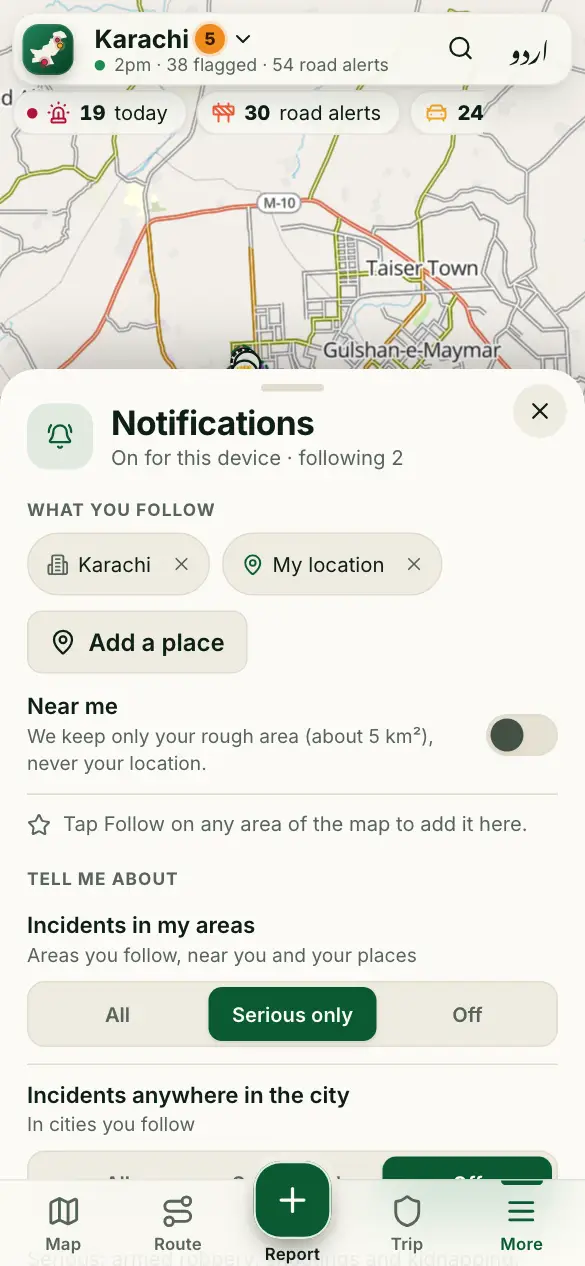
How to use it
- Tap More, then Notifications.
- Tap Turn on notifications and allow them.
- Choose what you want: incidents near areas you follow, road closures, summaries.
- Follow areas from their panel (Follow), or add “near me” and your own places.
Good to know
How many will I get?
At most 3 a day by default, never at night (11pm–7am). You can choose fewer, or pause them.
iPhone?
Add the site to your Home Screen first, then turn notifications on there. Or get the summary by email.
More guides
- 🗺️ Read the risk map
- 🔎 Find a place and check an area
- 🧭 My route: the best time to leave
- 📍 Share my trip
- 🆘 SOS, “Are you OK?” and the trip PIN
- 🔔 Watching someone’s trip: Alert me
- 📝 Report a crime or a road problem
- 🏫 Smog and fog closures
- 🚓 Find the nearest police station or hospital
- 📡 See what’s happening near you
- 🎬 Share a picture or a video
- 📲 Install the app and switch language
Figures come from verified sources, our team and community reports. No personal data is kept. How the risk level works