🧭 My route: the best time to leave
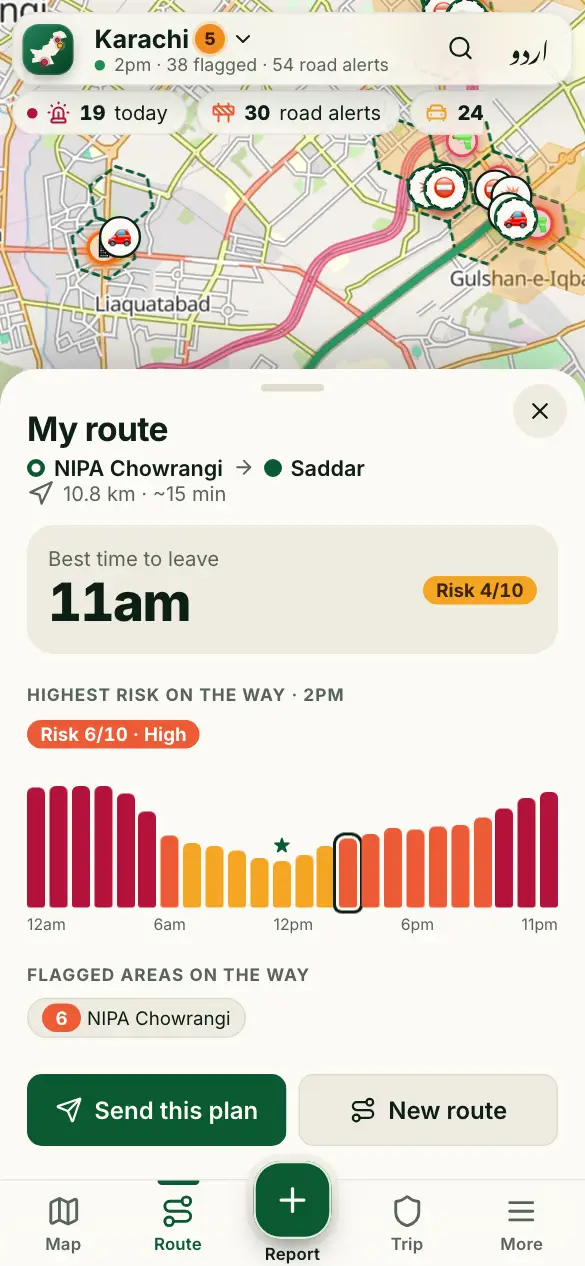
Check the risk along your way, and the best time to leave in the next hours.
How to use it
- Tap Route at the bottom.
- Choose where you start (your location by default) and where you’re going.
- Tap Check route.
- See the riskiest stretch on the way, and the best time to leave. Tap Send this plan to share it.
Good to know
Does it give directions?
No. It checks the risk along the road route, to help you choose when to go. Use your maps app for turn-by-turn directions.
Can I check a trip between two cities?
No. It checks trips inside a city, or between twin cities like Islamabad and Rawalpindi. If you are in another city, choose a start in the city you are going to.
More guides
- 🗺️ Read the risk map
- 🔎 Find a place and check an area
- 📍 Share my trip
- 🆘 SOS, “Are you OK?” and the trip PIN
- 🔔 Watching someone’s trip: Alert me
- 📝 Report a crime or a road problem
- 🏫 Smog and fog closures
- 🚓 Find the nearest police station or hospital
- 📡 See what’s happening near you
- 📣 Notifications and summaries
- 🎬 Share a picture or a video
- 📲 Install the app and switch language
Figures come from verified sources, our team and community reports. No personal data is kept. How the risk level works